

 Web search
 Links
Links Notes
Notes Files
Files Articles
 Contacts
 Home
Home Dashboard
 Tasks
Tasks Projects
 Messages
 Events
 Time tracker
 Forum
Forum Documentation
 Shell
Shell Workers
 Templates
 AI dashboard
 AI usage
 APIs & MCP
 Objects
# Visual Calculus for Programmers
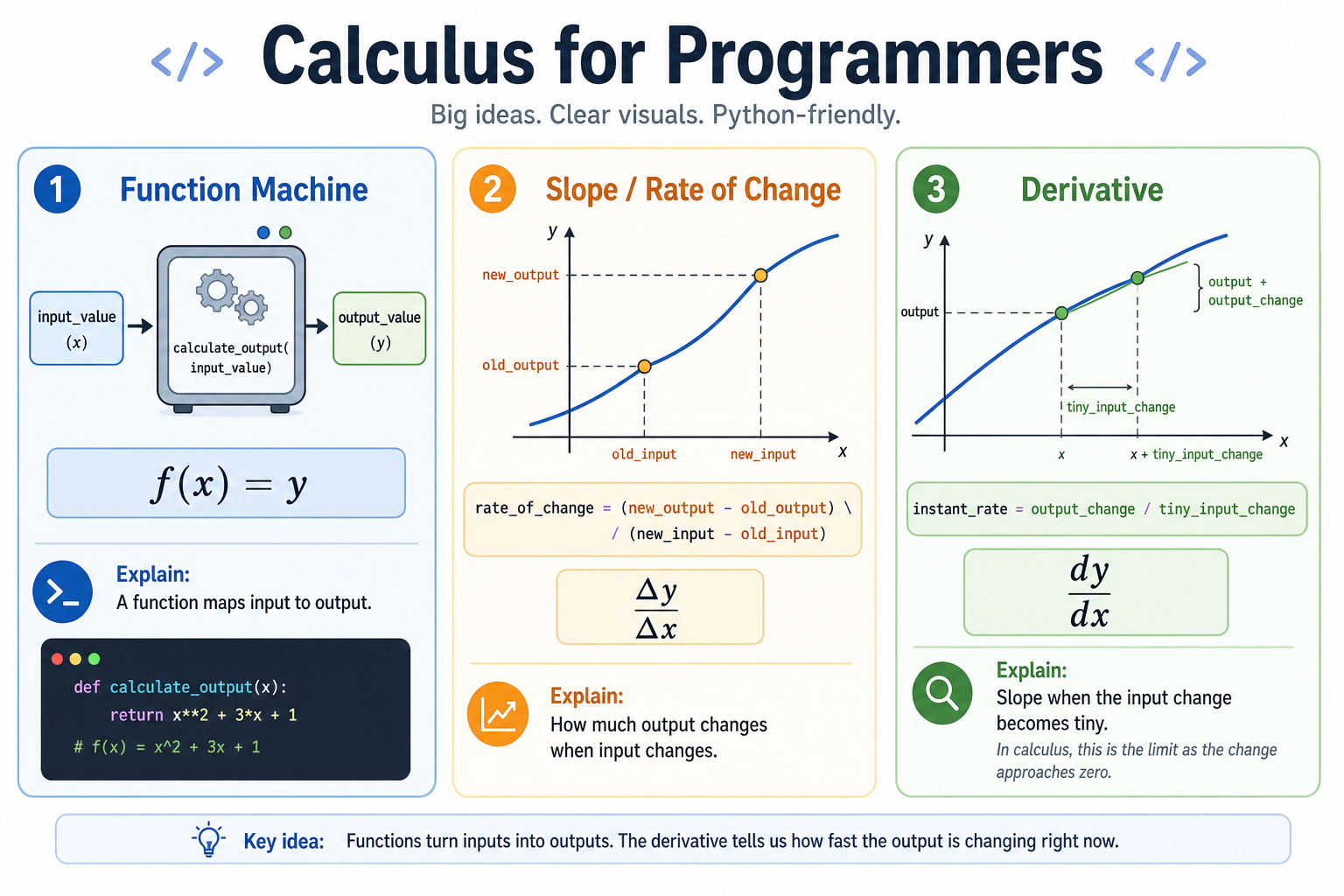
## Plain English first
Calculus is the study of **change** and **accumulation**.
- **Derivatives** answer: how fast is this changing right now?
- **Integrals** answer: how much has accumulated over time?
Every time you write a physics simulation, animate something, train a neural network, or compute a moving average — you are using calculus ideas, whether you know it or not.
## The picture
```text
A function is an input-output machine:
x → [f] → f(x)
Calculus asks two questions about f:
1. How steep is the curve at any point? ← derivative
2. How much area is under the curve? ← integral
```
## Standard math notation
**Derivative** (slope at a point):
```text
f'(x) = lim [f(x + h) - f(x)] / h
h→0
```
**Integral** (area accumulated):
```text
∫[a to b] f(x) dx
```
## Verbose Python with descriptive names
### Derivative — slope at a point
```python
def estimate_slope_at_point(function, input_value):
"""
Estimate how fast the function's output is changing at a specific input.
We can't use h=0 (that's division by zero), so we use a very tiny h.
As h shrinks toward zero, this estimate gets more accurate.
This is the core idea behind derivatives.
"""
tiny_h = 0.000001 # small but not zero
output_at_input = function(input_value)
output_slightly_right = function(input_value + tiny_h)
change_in_output = output_slightly_right - output_at_input
change_in_input = tiny_h
slope = change_in_output / change_in_input
return slope
# Example: slope of x² at x=3 should be 6
def square_function(x):
return x * x
slope = estimate_slope_at_point(square_function, input_value=3)
print(slope) # ≈ 6.000001 (very close to 6)
```
### Integral — area accumulated under a curve
```python
def estimate_area_under_curve(function, left_boundary, right_boundary, number_of_slices):
"""
Estimate how much area is under a curve between two x values.
Divide the region into many thin rectangles.
Each rectangle's area = height × width.
Sum them all up. More slices = more accurate.
"""
width_of_each_slice = (right_boundary - left_boundary) / number_of_slices
total_area = 0
for slice_index in range(number_of_slices):
left_edge_of_slice = left_boundary + slice_index * width_of_each_slice
height_of_slice = function(left_edge_of_slice)
area_of_slice = height_of_slice * width_of_each_slice
total_area += area_of_slice
return total_area
```
### Optimization — finding the best input
```python
def find_minimum_by_gradient_descent(function, starting_input, learning_rate, steps):
"""
Walk downhill along the function until you find the lowest point.
At each step, check the slope and move opposite to it.
"""
current_input = starting_input
for _ in range(steps):
current_slope = estimate_slope_at_point(function, current_input)
# Move against the slope — downhill
current_input = current_input - learning_rate * current_slope
return current_input
```
## The three big ideas, connected
```text
DERIVATIVE ← slope of a curve at one point
↑
| "zoom in until it looks like a line"
|
LIMIT ← what a function approaches
|
↓
INTEGRAL ← sum of infinitely many tiny slices
↑
| "zoom out, add up all the pieces"
```
Derivatives and integrals are opposites of each other — this is the Fundamental Theorem of Calculus. If you integrate a derivative, you get back the original function (plus a constant).
## Common mistakes
- Thinking you need calculus symbolically. Numerical approximations (like the code above) work for most programming problems.
- Forgetting that derivatives give you slope (rate of change), not the value of the function.
- Confusing "the area under the curve" with "the value of the function at a point."
## See also
- [Visual Limits for Programmers](/articles/78ce0fe1-1e06-4fd6-98a1-b539a8b5c99f)
- [Visual Integrals for Programmers](/articles/01b9a7a2-ec93-49ec-9c96-b71a39dc11dd)
- [Visual Optimization for Programmers](/articles/2752f4e0-dc22-4252-81fe-66acea5fefc3)
- [Visual Calculus — Table of Contents](/articles/fea3e669-0917-44f9-abee-4a012a962f96)