

 Web search
 Links
Links Notes
Notes Files
Files Articles
 Contacts
 Home
Home Dashboard
 Tasks
Tasks Projects
 Messages
 Events
 Time tracker
 Forum
Forum Documentation
 Shell
Shell Workers
 Templates
 AI dashboard
 AI usage
 APIs & MCP
 Objects
# Visual Limits for Programmers
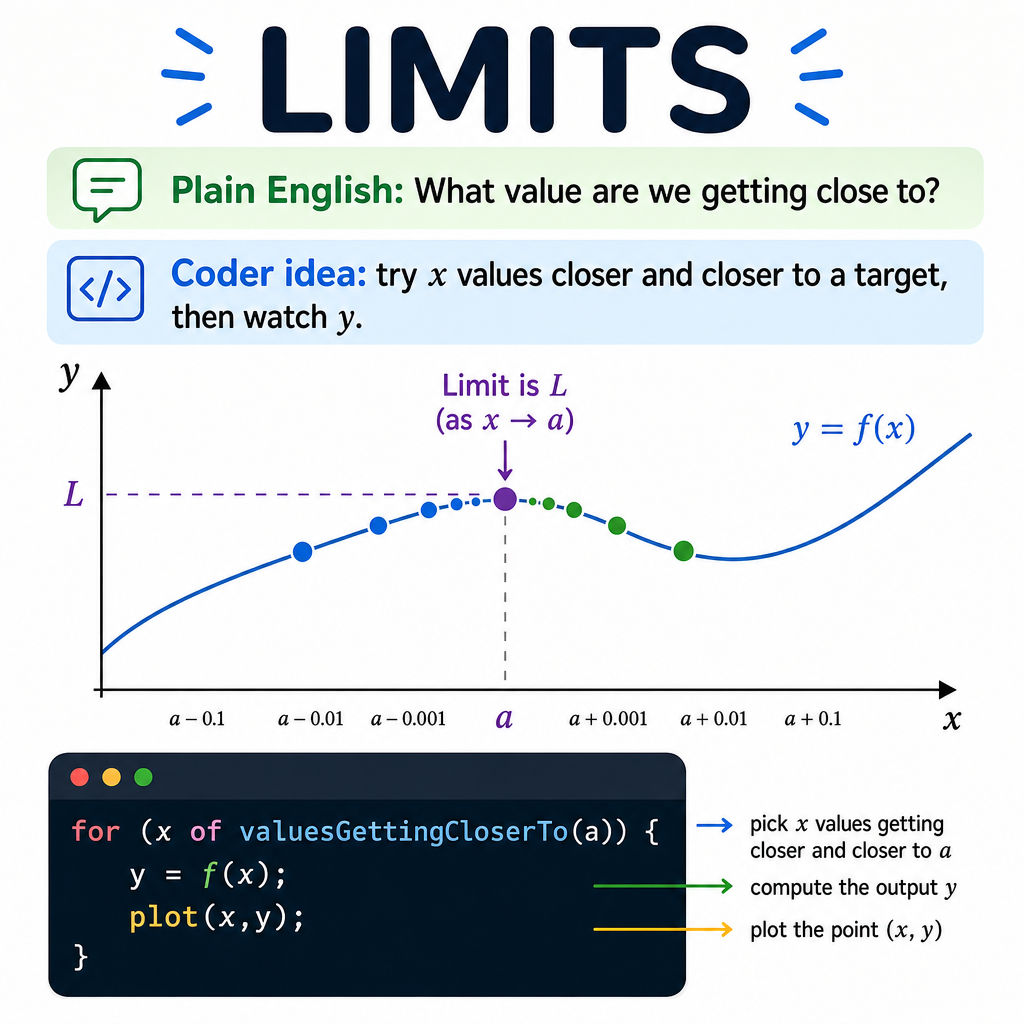
## Plain English first
A limit asks: **what value is a function heading toward, even if it never quite gets there?**
Think of driving toward a wall. You slow down as you approach. A limit is the wall — the value everything is moving toward — even if you never touch it.
You do not need to stand exactly on the point. You just need to watch where the outputs are heading.
## The picture
```text
x getting closer to 2 from the left: 1.9 → 1.99 → 1.999 → ...
x getting closer to 2 from the right: 2.1 → 2.01 → 2.001 → ...
Both sides squeeze toward the same output → that output is the limit.
```
## Standard math notation
```text
lim f(x) = L
x → a
Read as: "the limit of f(x) as x approaches a equals L"
```
## Verbose Python with descriptive names
```python
def estimate_limit_by_approaching(function, target_input, number_of_steps=10):
"""
Estimate the limit of a function at a given input by computing
the function at inputs that get progressively closer to the target.
This is how you would check a limit numerically — approach from both
sides and see if the outputs converge to the same value.
"""
print(f"Approaching {target_input} from the left:")
for step in range(1, number_of_steps + 1):
# Each step gets ten times closer to the target
distance_from_target = 10 ** (-step)
input_from_left = target_input - distance_from_target
output_value = function(input_from_left)
print(f" x = {input_from_left:.10f} → f(x) = {output_value:.10f}")
print(f"\nApproaching {target_input} from the right:")
for step in range(1, number_of_steps + 1):
distance_from_target = 10 ** (-step)
input_from_right = target_input + distance_from_target
output_value = function(input_from_right)
print(f" x = {input_from_right:.10f} → f(x) = {output_value:.10f}")
# Example: limit of (x² - 4) / (x - 2) as x → 2
# At exactly x=2, this is 0/0 (undefined). But the limit is 4.
def tricky_function(x):
return (x * x - 4) / (x - 2)
estimate_limit_by_approaching(tricky_function, target_input=2)
# Both sides converge to 4.0
```
## Why limits matter for programming
Limits make derivatives possible. To find the slope of a curve at one point:
- Pick two points very close together
- Compute the slope between them
- The limit is what happens as the distance shrinks to zero
```python
def approximate_slope_at_point(function, input_value):
"""
Estimate the slope (derivative) of a function at a specific input.
This is the limit of (f(x+h) - f(x)) / h as h → 0.
"""
tiny_step = 0.000001 # h, very small but not zero
output_at_x = function(input_value)
output_at_x_plus_h = function(input_value + tiny_step)
rise = output_at_x_plus_h - output_at_x
run = tiny_step
slope_approximation = rise / run
return slope_approximation
```
## Common mistakes
- Thinking the function must be defined at the target point. It does not — the limit only cares about nearby values.
- Confusing the limit (what the output approaches) with the actual output (what the function equals at that point). These can differ.
- Expecting limits to always exist. If the left and right approaches give different values, the limit does not exist.
## See also
- [Visual Calculus for Programmers](/articles/cbda355b-86cb-4c12-aebb-de239c2eb6b4)
- [Visual Integrals for Programmers](/articles/01b9a7a2-ec93-49ec-9c96-b71a39dc11dd)
- [Visual Optimization for Programmers](/articles/2752f4e0-dc22-4252-81fe-66acea5fefc3)
- [Visual Calculus — Table of Contents](/articles/fea3e669-0917-44f9-abee-4a012a962f96)