

 Web search
 Links
Links Notes
Notes Files
Files Articles
 Contacts
 Home
Home Dashboard
 Tasks
Tasks Projects
 Messages
 Events
 Time tracker
 Forum
Forum Documentation
 Shell
Shell Workers
 Templates
 AI dashboard
 AI usage
 APIs & MCP
 Objects
# Visual Integrals for Programmers
## Plain English first
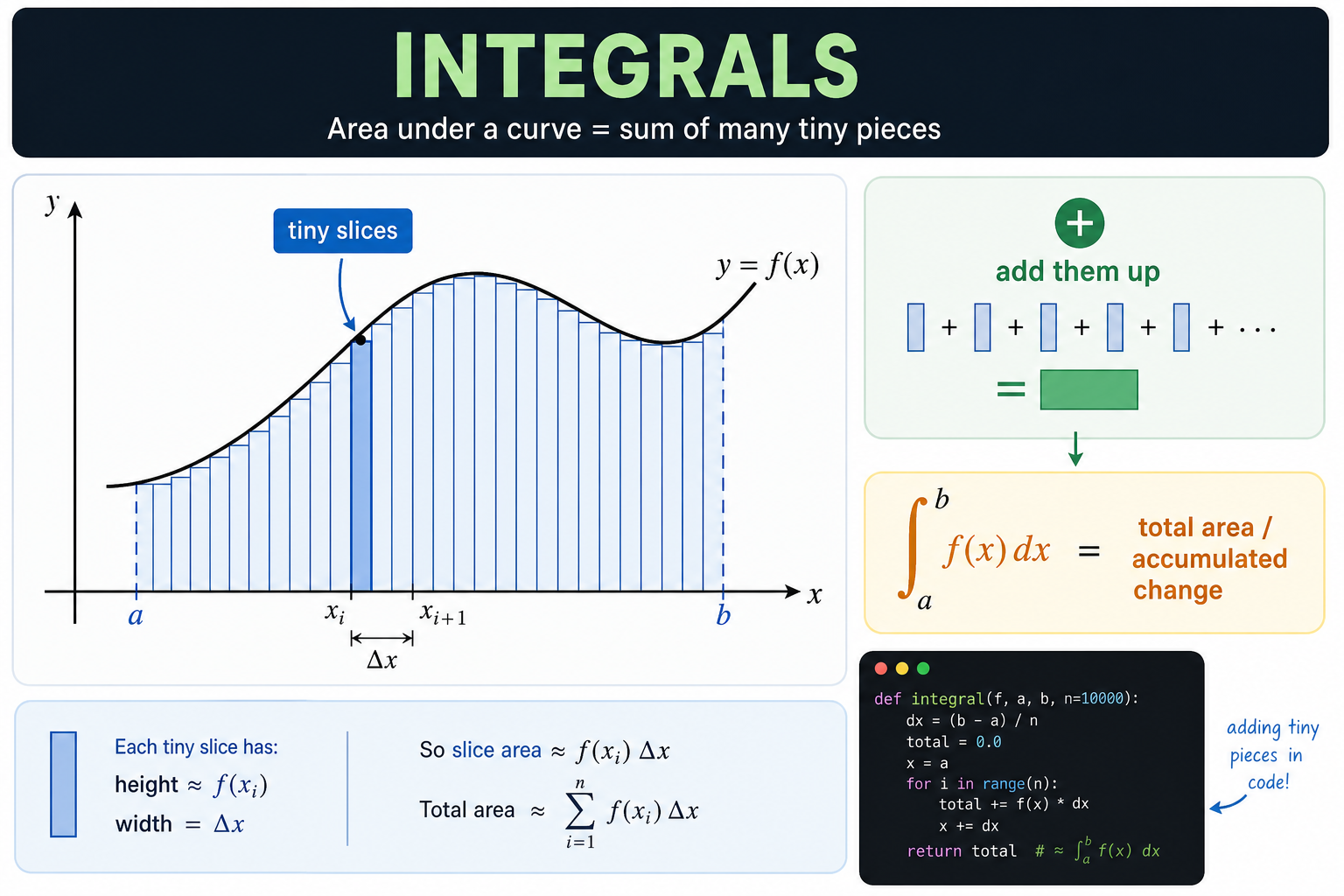
An integral adds up a huge number of tiny pieces.
Picture a hilly field. You want to know the total area. You can't measure it in one go — so you slice it into thousands of thin vertical strips, measure each strip's area (height × width), and add them all up.
The integral is what you get when the strips become infinitely thin.
## The picture
```text
f(x)
| ***
| ** **
| * *
| * *
| * *
|* *
|________________ x
a b
Sum of all the thin rectangles underneath the curve
from x = a to x = b
```
## Standard math notation
```text
∫[a to b] f(x) dx
Read as: "the integral of f(x) from a to b"
dx means "a tiny slice of width dx"
```
## Verbose Python with descriptive names
```python
def compute_area_under_curve(
function_to_integrate,
left_boundary,
right_boundary,
number_of_rectangles
):
"""
Estimate the area under a curve between two x values.
Splits the interval into many thin rectangles.
Each rectangle has:
- width = total_width / number_of_rectangles
- height = function value at the left edge of that rectangle
Adding all rectangle areas gives the approximate integral.
More rectangles → more accurate answer.
"""
total_width_of_interval = right_boundary - left_boundary
# Width of each individual rectangle slice
width_of_each_slice = total_width_of_interval / number_of_rectangles
accumulated_area = 0
for rectangle_index in range(number_of_rectangles):
# x position at the left edge of this rectangle
x_position = left_boundary + rectangle_index * width_of_each_slice
# Height of the rectangle equals the function value at this x
height_of_rectangle = function_to_integrate(x_position)
# Area of this one rectangle
area_of_this_rectangle = height_of_rectangle * width_of_each_slice
accumulated_area += area_of_this_rectangle
return accumulated_area
# Example: area under f(x) = x² from 0 to 3
# True answer: [x³/3] from 0 to 3 = 27/3 = 9
def square_function(x):
return x * x
estimated_area = compute_area_under_curve(
function_to_integrate=square_function,
left_boundary=0,
right_boundary=3,
number_of_rectangles=10_000
)
print(estimated_area) # very close to 9.0
```
## What integrals measure in the real world
The key insight: integrals measure **accumulation over time or space**.
| Situation | Function f(x) | Integral gives you |
|-----------|---------------|-------------------|
| A car accelerating | speed at time t | total distance traveled |
| Water filling a tank | flow rate at time t | total volume added |
| Revenue over time | dollars per day | total revenue |
| Signal strength | power at frequency f | total energy |
## Common mistakes
- Thinking more precision always matters. For most applications, 1000 rectangles is already very accurate.
- Forgetting that the function can be negative — areas below the x-axis subtract from the total.
- Confusing "area under the curve" with the shape's visual area — if f(x) dips below zero, the integral can be less than the visual area.
## See also
- [Visual Calculus for Programmers](/articles/cbda355b-86cb-4c12-aebb-de239c2eb6b4)
- [Visual Limits for Programmers](/articles/78ce0fe1-1e06-4fd6-98a1-b539a8b5c99f)
- [Visual Optimization for Programmers](/articles/2752f4e0-dc22-4252-81fe-66acea5fefc3)
- [Visual Calculus — Table of Contents](/articles/fea3e669-0917-44f9-abee-4a012a962f96)